In a recent post,
RWW reports that “In a study of 300 hiring managers and
recruiters, Palo Alto-based social networking monitoring service Reppler
reports that 76% of hiring managers look at applicants' Facebook profiles. An
additional 56% are looking at Twitter, and 48% check out LinkedIn.”
The fact that recruiters should be checking out basic info
on social networks makes perfect sense to me. Unfortunately this doesn’t seem
true, at least for Indian recruiters. I recently got a call from a recruiter,
apparently someone involved in senior level recruitment in a reputed
recruitment firm in India. So this guy starts with introducing himself and how
he is specifically focused on senior level recruitment and how they carefully handpick
the candidates for select senior level jobs. He goes on to say that he got my
reference through someone (he wouldn’t reveal his ‘source’).
After the pleasantries, he asks me about my career background.
I said my career profile is listed on LinkedIn and asked him if he had checked
that before calling me.
Oh we don’t check LinkedIn profiles, we are required identify
candidates from independent sources, he says to my surprise.
Sure, that’s okay but having identified me from independent
sources, why haven’t you checked my public profile before calling me?
Oh no, we aren’t supposed to do that.
Duh!!!!!!!!
Why don’t the recruiters realize that they are wasting the
candidate’s and their own time by not reviewing the profile on social networking
sites? Surely they will be able to find a better job-candidate match by
reviewing the profile before they approach the candidates.
Jane Hart
seeks rebuttal to
reasons commonly given by organizations for banning social media at work. I have heard some of these. Here’s why I believe organizations should NOT ban social media, rather find ways to leverage it. Some of these are in the Indian context of hiring and retaining workforce. I am adding an 11
th reason that I have heard for why organizations ban social media that could perhaps make it to the list.
11. Social media takes up too much of company’s Internet bandwidth hampering other work.
Given the advantages of social media, and reducing cost of bandwidth, it might be a very worthwhile investment by the organization. Investing in bandwidth is probably as critical, if not more, than investing in higher-end machines and laptops.
10. Social media is a fad.
If so do you want to be left behind and not know anything about it?
9. It’s about controlling the message.
If it is are you using the channels available to you and the employees? Just because social media is banned at work does not mean employees don’t have access to it at all. They are on it whether you like it or not. And if you are indeed worried about controlling the message, are you on the same channels are your employees are?
8. Employees will goof off.
If employees have to goof off they will, whether they have access to social media at work or not. If you are managing your work allocation and performance management well, and have the right business measurements in place, it doesn’t really matter whether employees goof off or not. If you are measuring the time they are spending on activities rather than the results they are expected to achieve, you are probably a lawyer or a consultant billing by the hour. I can’t comment on lawyers but as a consultant, you better focus on results or you’ll be out of business.
7. Social media is a time waster.
See point 8.
6. Social media has no business purpose.
If your customers aren’t on social media, investors aren’t on social media, stakeholders are not on social media, employees are not on social media, competition is not on social media, and you don’t believe in continual learning, keeping track of market trends etc., then yeah, perhaps social media serves no business purpose for you.
5. Employees can’t be trusted.
If you can’t trust of your employees, why are you in the business that needs employees? Do you trust them enough to let them talk on phones, use email? Then you can trust them with social media. Yeah sure there are sensitivities of using social media on which you should coach your employees, just as you would to use the phone or email. The
video talks about employees can’t be trusted to not put up photos on the office party. Well what’s the harm? It’s a great opportunity to tell the world what a fun place to work your organization is, and therefore attract more talent for your organization, especially when the workforce is getting younger (also see point 4).
4. Don’t cave into the demands of the millennials.
Enough demographic studies show that in India the workforce is getting younger. Wouldn’t you want to create an environment that your workforce relates to and enjoys? Would you want to create an environment that your workforce finds stifling? You could potentially use social media access as a retention strategy.
3. Your teams already share knowledge efficiently.
Cool, so you will understand how social media makes it easier to serve this objective.
2. You’ll get viruses.
So get better anti-virus protection software and better processes to update your computer with latest patches.
1. Your competition isn't using it, so why should you?
Don’t all business gurus tell you to do things your competition isn’t doing to get ahead in business? Do you really have this as a reason for banning social media at work? Duh!
I am sure you’ve heard this before, what with 54% companies banning social media sites. Of course, Twitter and Facebook are complete waste of time. Reading and writing blogs is a complete waste of time too. I also hear some executives say email is a waste of time too. And phone? What does everyone talk about anyway? They should get off the phones and just work (and I have had managers complain that personal calls were affecting productivity of some people). I think books are a waste of time too. After all what good could possibly come out of reading anything.
Social media is a tool, a medium. What you do with it constitutes the value you extract from it. Twitter can be a very useful productivity enhancer tool. However if you use it only to catch up with friends, chat about what you are having or review movies (and there is a lot of that going on on Twitter), then yes companies will see it as a productivity sapper. Facebook is a great way to connect with people. But are you spending too much time playing Farmville or answering who is the best looking friend, then yes Facebook is not exactly going to be popular with your boss. Blogs are a great tool to reflect what you have learned, great way to connect with other thinkers and great way to learn. But if you are overactive on your blog about movies, your landlord, or your blue umbrella (yes I have seen this posts with more than 50 comments on how someone got wet because they forgot the blue umbrella or something like that), then companies aren’t necessarily going to be thrilled by it. You can spend all your time reading John Girsham or Harry Potter, but companies would prefer if you read Good to Great, Built to Last or Wikinomics or something like that and implement your learning in your work.
So if you don’t want companies to ban Twitter, Facebook or other social media sites, then show your boss the value you are getting from them and how the company can benefit from it.
What came first – chicken or egg?
Most people don’t get benefit of social networking because they don’t have a large enough network. And then they don’t build their network because they don’t get the benefit.
Have patience. After all if it takes 10,000 hrs to become an expert, how can you expect to get benefits from social networking by simply creating accounts on various social networking services but not actually using them?
So LinkedIn now allows you to update your status with your Twitter updates. There are already applications that help you post your Twitter updates to Facebook. And then there’s FriendFeed that allows you to consolidate all your social activity and push that on Facebook and other social media sites. Not to mention other aggregation services, RSS feeds, email alerts, etc. etc.
Seems like a cool thing, surely. Well almost. If your social network across different social media services looks like below, then posting the same update on different services makes sense. After all, there’re only a few connections that are common across different services you use and pushing the same update on all services helps you get the message to a wider connection base.
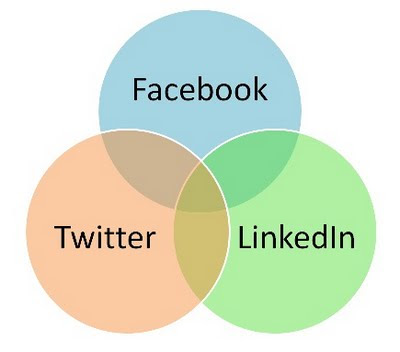
However, if your social network looks like the one below, you are bombarding your connections with the same update on all networks. This can be very irritating for your connections.
My rule of thumb – limit convergences of updates on different social media services irrespective of the overlaps of your connections.
I came across the following tweet from someone who I am following:
Is twitter a social networking or a professional networking tool? I really dont want to know ur progress through the day unless ur a starlet
The choice is really yours, the users. What you absolutely can’t control is what others tweet. You decide who you want to follow. And even the people who tweet ‘professionally’ are also humans (unless you are following a bot or a company/publication, in which case this conversation doesn’t hold good). And humans are rarely uni-dimensional. Even professionals have families and friends and have other interests besides work. There will be tweets related to family and friends, movies they recommend, walks they walk, runs they run and hikes they take. Spouses will say funny things to be shared, children will fall ill and best wishes will follow. The beauty of the open architecture of twitter is that you can decide not to follow someone. However asking others to tweet to your tastes is expecting too much.
What is a social networker in Hindi? Jugaadu! A jugaadu is someone who knows people and can get things done. Isn’t that the essence of social networking or networking in general? Basically know more people so you can get the info when you need it, or get a job, or get a business deal etc.
Jugaadu n. /jü-'ga-d&-'ü/ (जुगाडू): a person one who has numerous useful and cashable Jugaads. A person who will always find you a resourceful / creative solution to problems. Synonym: Bricoleur (French)
Jugaad n. /jü-'ga-d&/ (जुगाड़): an improvised or jury-rigged solution; inventiveness, ingenuity, cleverness. Jugaad is slang for "Jugat" (in Punjabi) which has its root in "Yukti" in Sanskrit, meaning solving a problem that typical linear logic will not work. Synonym: Bricolage (French)

Everyone’s talking about
Twitter. So here's my addition to the conversation based on my experiences with Twitter as
@manishmo.
What is Twitter?
To me it is various forms of IM, asynchronous chat, chat room, email, SMS on the Internet, blog (micro-blog) depending on how you use it.
I also like this explanation by Chris Brogan:
Twitter is a stream. Facebook is both a stream and a stopping point (but mostly a stream). Your blog is a stopping point pretending to be a stream. It’s important to think about where you want information to live, and how you want it to impact the world. For everything you toss into a stream rolls past, and if I’m not at the stream when you throw your leaf onto the waters, I’ll miss the leaf entirely, or perhaps catch only the ripples.
How do you get started with Twitter?
Rohit Bhargava explains 5 stages of Twitter acceptance:

I think I am somewhere in stage 2, 4 and 5!!! I have had some 1x1 conversations, published some useful information. I have made met new people on Twitter, just like I did when I started to blog or using Facebook. But I still don’t really get why people love it SO much.
Tools I used for Twitter?
I started with using Twitter in the browser. I tried Twhirl client. However I have now settled on using TweetDeck. TweetDeck is an AIR desktop application. It provides up to five multiple column display (if you set it that you can set to to Narrow columns in Settings). I usually have one column for replies, one for friends, one for search results. Remaining two column can be used for Direct messages (don’t have many so don’t use it for this), another search result or seeing info about Twitterers (!). Update: Now that I have used TweetDeck for a while, I have figured that it allows you to organize people you are following into groups. You can add columns for your groups. This really makes it easy to manage the large volumes of tweets.
Other interesting tools/utilities about Twitter?
I found some useful and some completely useless but fun stuff services/utilities that give you information about Twitter accounts.
follow cost provides you with useful information about average number of tweets by a user. Useful to know what you can expect when you start following someone.
TweetWheel in an interesting application that shows how your friends are connected to each other. This may take a long time if you have many friends.
TwitterFriends provides some stats about your conversations. Not useful if you are just starting out.
Bottom line:
If you are feeling bogged down with email, don’t even think of trying Twitter.
Would I recommend or encourage Twitter’s usage in corporate environment? Well, I am not really sure but I am tending towards a ‘No’ at this time. If there was a Twitter behind the firewall with only employees of the company as users forming a reasonably homogenous user base, then maybe. But in its current state, Twitter can be a real distracter. It needs quite a discipline to manage your follow list. So if you typically work with 10 tabs open in your browser and multiple windows open on your screen, then yeah sure. But Twitter is not for everyone.
Update:
Based on inputs from Tom, I have started Yammer in my workplace. It was slow start initially but seems to be picking pace now. I started with introducing a few people to Yammer and the tribe has now grown to 55 of us on the Yammer network for our organization. The message are now starting to come in from more users.
This post is part of the Work at Learning/Learning at Work blog carnival hosted by Dave Ferguson on his blog Dave's Whiteboard.
Labels:
3D Worlds,
Content,
eLearning,
Learning,
Predictions,
Social Networking,
Telepresence,
Training,
Trends,
Virtual environments,
Workplace Learning
Geetha Krishnan asks "what kind of learning formats will be in vogue in the year 2020, specifically with respect to corporate training?" My short response that I left as comments on his post is given below. Don’t miss out on other comments on his post from experts in the industry.
Man (as in generic human, not intended to be sexist), has forever learned from teachers, gurus. Knowledge has been passed down through ages by the teachers/gurus. The medium changed over the years. The common thread that I see is that the changing media has continued to facilitate increased access to teachers, and communication between teachers and learners. The changing media has also improved the ability to visualize content and explain things in more graphical way.
So in the next 20 years, learning formats that continue to increase the accessibility of teachers will be in order. Telepresence comes to mind. Perhaps it will develop into 3D/hologram type telepresence that will allow teachers to be more accessible to learners.
Social learning, learning 2.0, social networks, user generated content etc. to me are additional means of connecting teachers and learners. All these make more teachers accessible to more learners and these modes will continue to thrive.
3D worlds also make it easier for content to be visualized better and make learning more effective. Usage of 3D Worlds for learning should increase in the coming years.
Seth Godin
recently wrote Do you know enough?
If not, what are you doing about it?
If so, who do you think you're kidding?
[Interesting side alley: I was talking to a friend yesterday and encouraged her to speak at an upcoming conference. She said, "No way. I don't know enough." I explained that volunteering to speak was the best way to be sure that she'd end up knowing enough by the time she was through.]
When I recently got a chance to speak at our annual strategic input conference, I thought Why Not. I am no expert (yet J) and opportunities like these help me learn more about areas of my interest.
I spoke about the web and mobility. My presentation was divided broadly into four parts. I started with a recap of Web 2.0 and some changes from Web 1.0, and getting the audience to check their Web 2.0 Quotient. I followed this up with some trends that I have been observing and how companies can/should use the Web to connect with their customers. Finally I left the audience with what I believe are two critical tools to get started on the Web and some next steps for them to get started with Web 2.0.
My main message – You can’t ‘learn’ about Web 2.0 in classroom or in a conference. You have use it and experience it to leverage its power.
Here’s my presentation on SlideShare and some notes about what I spoke.
Trends:
- There are enough demographic studies to tell use that the workforce is getting younger. The younger workforce is more adept at using technology, and this is not limited to a particular socio-economic section. Depending on where the audience is from, they will be relatively more tech savvy. How are we going to connect with them, train them and also leverage their inherent tech savvy mindset is going to be the opportunity in coming few years.
- While Second Life is clunky, slow and can’t be accessed through most corporate networks, we should watch out for 3-D virtual worlds. While the current use in training and business is limited, their use will increase in times to come. I encouraged everyone to get a Second Life account and try out the 3-D worlds for themselves just to get an experience. It is a little hard to imagine what it is like without actually being in one.
- Telepresence will increase and will not be limited to just high quality video conference, even though that is what it seems in the first instance. The video of John Chambers and Marthin De Beer is a good example of what telepresence can do and give rise to new applications.
- Mobile phones have a far greater penetration than the Internet, at least in India. In India, while 3.7% population has access to the Internet, nearly 30% population has access to a mobile phone. With the increase in sales of the smart phone, the Internet will reach the people faster on a mobile phone than on a PC. It is going to be a great tool to reach out to the customers and applications using mobile technology will increase significantly.
- Web 3.0 will provide even more freedom to the users.
Connecting with the community
- When you see Baba Ramdev talking about Google Chrome in his billboard advertising, you know times are a changing. So how are you connecting with your customers? Your customers are everywhere on the Web. What’s your company’s web strategy in connecting with your customers?
- With the Web, there are a lot more channels for your customers’ voice. Your customers may not always communicate directly with you. With so many websites primarily aimed at carrying customer’s voice, it is imperative that companies listen to what their customers are saying in public forums.
Critical tools to get started
- The most common issue with managers is that they don’t have the time to do all what I have said above. While all this Web 2.0 mumbo-jumbo is fine and sounds great, where is the time to try all these things? Well, I suggest that all managers start with Feeds and Google Alerts. Feeds allow you to scan your selected sites quickly for updates. Alerts help you track what’s being talked about on the Web. Most managers have a smart phone with Web access. We need to start using the smart phones for more than just email.
- Most feed readers have a mobile version available allowing you easy access to updates without necessarily being on your laptop.
- Google Alerts provide you with daily email alerts about your search keyword. This is a great way to track what’s being said about your company or your area of interest.
Recently a proprietor of a small firm asked me how he can get more clients, including international clients. So with all my new found Web 2.0 and social media interest, I suggested that he start building contacts on social networking sites. I asked him to start building his contact list on LinkedIn. I also suggested that he starts participating in various groups on LinkedIn, basically increase web presence of himself and his company.
I met him a few weeks later and asked him how he was progressing on building his network. He sheepishly told me he hadn’t made much progress. On my asking why, he said that he feared that his competitors would get hold of all his contacts and approach his clients to takeaway his business. His fear completely flummoxed me. I could tell him that he could stop others from viewing his contacts but I have a feeling that it might still not be enough to get his started. So what do I tell him to get him started?
Announcing the launch of
eCube Community Social Networking site. Connect with other like minded professionals in the field of learning, education and training. Create your own social networking
friend circle, write your
blog, form
groups to
discuss specific topics, and share
bookmarks,
photos and
files.
Register now and join the community. Set up your profile to share your interest and skills.
This month’s Learning Circuits Big Question asks where is the best place to ask if you need input from people, what works and doesn’t work, what did you consider using, what was the outcome, ...
Continuing with my experiences with social networking, I have tried to use blogging to connect with people and get answers. However I haven’t been very successful in generating a dialog through my blogs. Perhaps my blog has very small readership, or perhaps people aren’t comfortable commenting.
As part of my journey in social networking I also started two communities – on Facebook and LinkedIn. Somehow it seemed harder to get a dialog on Facebook community but LinkedIn community got the dialog going quicker initially.
I recently sought inputs on a presentation I had to make. I posed the question on my LinkedIn community and didn’t get any response. I also sent a message to my Facebook community inbox instead of posting it to the group site. I got most response using this method. It makes me wonder if email is still the best form of social networking.
I am relatively new to social networking and social media. I remember my first encounter with social media was on a new Indian social networking site about 17-18 months ago. The social networking site’s interface was a combination of Orkut and Facebook-style networking (which I figured later after I started using Orkut and Facebook). So here I was on this social networking site but I couldn’t see anyone to network with (it didn’t let you see anyone’s profile unless you were their ‘friend’). On their open chat room, I asked what the point of this site was. I was told by someone that I could invite the ‘real’ friends I knew and grow my network. I felt a little silly. But I already know all my ‘real’ friends. What’s to network with them? I thought the whole point of these social networking sites was to expand and build new networks. I gave up first attempt at social networking within an hour of trying, turn my nose up, wondering what all the fuss was all about when I couldn’t really connect with people I didn’t know.
Thankfully I progressed on to using the social networking sites and even started my own communities, figuring things along the way. Blogging definitely helped my journey in using the many social networking sites. I primarily started building my social networking on Facebook. Initially I found Orkut a lot more ‘social’ and Facebook a lot more ‘professional’. However I now figure it just depends on which communities you connect to on each of these sites. I have since figures that LinkedIn perhaps truly ‘professional’ networking site while Facebook and Orkut have a much more ‘social’ side to them. I have also felt that Orkut seems to have a much larger Indian community than on Facebook before finding some statistics recently that validate this.
The social networking sites have also made it easier for me to remember birthdays by transferring the responsibility to the person whose birthday I should remember J. And like mobile phones ruined my ability to remember phone numbers, social networking sites are making remembering email addresses a futile exercise.
As my online presence grew (though still miniscule compared to many other bloggers I follow), I started getting ‘invites’ to be ‘friends’ on Facebook, Orkut and LinkedIn. Many old colleagues were connecting with me. I get scraps on Orkut seeking my inputs on career and education. I have also started reaching out to people I don’t know. I always try to provide a brief intro/background/intent of my connecting with them. I am petrified of connecting with an old acquaintance with no introduction or an introduction like “Hi, remember me?” What if they don’t? So I play it safe and provide some introduction. It is also better to receive introductions that have some background.
I also figured (again) that humour or something said in lighter vein can easily be misinterpreted. I should know this but still have learning experiences. And no, a smiley in my message does not necessarily mean that the intent will be transmitted and interpreted correctly by the other person. So humour is highly avoidable with professional contacts with who I have not yet established some sort of communication rapport.
Based on some of the feedback I received, I have made a few modifications to the Web 2.0 Quotient. There is greater focus on collaboration and not just having an account with the Web 2.0 services.
Check your Web 2.0 Quotient here.
Please keep your suggestions coming and help this evolve. Please share your score in the comments (Post a Comment link below).
Related posts:
Disclaimers:
Uses rudimentary MS Excel features and is highly dependent of retaining the format and location of cells. No great programming has been attempted here. I still haven’t been able to figure out how to put this online.
I received some very useful feedback on various forums on the rudimentary form I created to check your
Web 2.0 Quotient.
Carla Arena writes:
Well, first I must confess that being comfortable and having a high IQ on the Web is not about the services you use and how often you connect, but how you're using it to connect to others and learn. Anyway, I had fun with your form, but I'd change it to a Web2.0 version using a google docs form, rather than an excel program that you have to download. Just an idea...
Steve Tuffill writes:
Well Manish - I scored a 73 in your Excel spreadsheet-based test. I tend to agree with Carla though. It may have been more appropriate in a Web 2.0 based environment like Google Docs. And certainly the figures would speak volumes about the trends of using the technology which we are all studying so closely.
I would be interested to see what everyone scored on this test. Are you planning on making this capable of aggregating the data centrally?
Also, what exactly does my 73 score tell you (or anyone else for that matter) about me?
Roberta Miller writes:
So I have to say I was really disappointed in this. I find am having trouble finding the "greatness" or importance of "Web 2.0". I generally don't tend to respond to posts I read, but I am trying to break out of my this and start voicing my opinion.
I think you did a great job in creating the form, and it was fun participating so in that sense it was a success. After reading the questions though I felt a little let down. "Is that all there is to Web 2.0?"
I scored a 42 by the way. There were some questions I had to leave blank though because I couldn't find the appropriate answer.
Added later: I sent the form to my 21 year old to she scored 27. What does it all mean?
Catherine Fitzpatrick writes:
I'm with Roberta on this, though I scored 83, more than double her score, but I have even MORE of a sense of "Is that all there is?"
And she's right, that the answers are too pat. For example, it could ask me if I like or trust wikis -- I would say "no," although I'm forced to use them. She could ask if I actually show up on Facebook, which I don't much, etc. It doesn't chart usage.
And even if it does, there isn't really the hard question that needs to be asked: do you get paid to do this? Does this pay out to you? Does this get used in your job that pays you? And the answer for most people will be a resounding NO. I'm lucky it does pay out some modest amount for me, but nowhere near my value per hour spent at some other occupation.
...
George Siemens writes:
I'm with you (Roberta) on "is this all there is to web 2.0". At best, these tools are an instantiation of a longer cycle of change. When schools create new reforms based on the current fad/flavour, they do themselves and their "stakeholders" a disservice. I would just as soon do without web 2.0. But, it seems, that we need umbrella terms that encapsulate complex ideas. So discussions of participation, openness, technologies, read/write web, etc. get pressed into a term. And once we adopt the term, it in itself becomes a limiting influence to new innovation.
The common threads in all these are some answered questions and suggestions:
- So what do the scores mean?
- Is that all there is to Web 2.0?
- How often do you connect is more important than just having a registered user ID on the services.
- Should be online on Google docs or something similar.
- Would be great to see other’s scores.
I don’t necessarily have the answers to the questions. I believe the quotient creates an awareness of the services and tools that might be considered Web 2.0. I agree completely that how often one connects and networks on the web is more important than being registered on the services. The quotient will evolve and feedback will contribute to it.
I tried to create Google docs and Zoho form for the quotient. However I still don’t know how to translate form responses to numbers that can be added to give the Web 2.0 Quotient. Any suggestions on what I could use to do this?
While Kevin Kelly talks about Internet of things as he predicts the next 5000 days, the question is are we even ready for the present? We are still struggling with Web 2.0 and Learning 2.0, trying to bridge the gap between digital natives and digital immigrants.
So are we really ready for the future? How well do you use the web in the present? Are you familiar with the Web 2.0 mumbo-jumbo? Do you utilize the web to connect, learn and grow? What is your Web 2.0 Quotient? Here’s a simple form I created to check your Web 2.0 Quotient.
Check your Web 2.0 Quotient here.
Simply answer a series of questions and see how you score on the Web 2.0 quotient.
My score: 68. What's your score?
Have I missed anything? I am sure I have missed many things. Do provide your suggestions to improve this.
Disclaimers:
Uses rudimentary MS Excel features and is highly dependent of retaining the format and location of cells. No great programming has been attempted here.
Update: See responses in a this new post.
Seth Godin writes about how he selected candidates for marketing and web internship. He was overwhelmed by the quality of applications he got, so he created a Facebook group for candidates to meet and hang out online. As he explains:
It was absolutely fascinating. Within a day, the group had divided into four camps:
- The game-show contestants, quick on the trigger, who were searching for a quick yes or no. Most of them left.
- The lurkers. They were there, but we couldn't tell.
- The followers. They waited for someone to tell them what to do.
- The leaders. A few started conversations, directed initiatives and got to work.
Nifty experiment! Read full post
here.
There is enough written about using LinkedIn. However I recently discovered an interesting feature on LinkedIn from a company’s point of view. Since the official LinkedIn blog introduces this feature on Aug 18, I am guessing it is a new addition to LinkedIn.
LinkedIn now has hundreds of Company Profiles. Select Companies link on the top links bar. You can view companies by location, industry, name, and companies in your network.
 (this grab from LinkedIn blog)
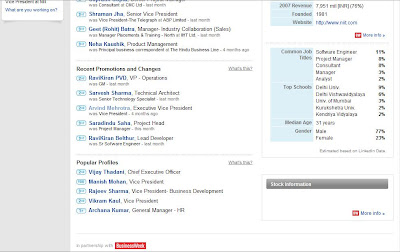
On the company profile there are some interesting pieces of information. It shows career paths of employees before and after their employment with the company. It also shows employees most connected to which other companies. Aha, that’s where most of our employees are headed...

The company profile shows new hires, and recent promotions and changes of employees. More interestingly, under Key Statistics section it shows common job titles. These are job titles of employees in the company who have registered with LinkedIn. So in my company Software Engineers, followed by Project Managers and Consultants are the most common job titles on LinkedIn. Hope this provides some useful information to HR.

The Key Statistics section also shows that of all the people from my company on LinkedIn, 77% are males. I know for sure that the gender ratio is pretty much even in our company. So does this mean that males from my company are more likely to be using LinkedIn than females?
Finally it shows popular profiles from the company. Does it help if my profile shows up as the second most popular profile after the CEO of the company? :-)
Related links:
It’s been more than 6 months since I
last posted my top 10 tools for learning. I thank
Jane Hart for making me think to update the list for Centre for Learning & Performance Technologies’
compilation of top 10 tools for learning of as many as 184 learning professionals. There are some changes since I last wrote, though many of the tools and techniques still remain in my top 10 list.
Here are my top 10 tools for learning in Aug 2008.
- Search engines – though Google is still my most used generic search engine, I have discovered and used few other more specific search engines. I frequently use Flickr and LinkedIn search add ons installed on my Firefox. I also use Summize (which has since been acquired by Twitter) to search Twitter tweets.
- Blogging – blogging continues to help me reflect on my thoughts and crystallize my learning. I still use Blogger for my personal blog and have moved to hosted Wordpress for my team blog.
- Blog Feeds – I read blogs via RSS feeds. Have been on Google Reader so far and recently discovered Feedly. Feedly integrates very well with Google Reader and presents a very nice magazine-like interface. I just love reading my RSS feeds on Feedly now.
- Social Networks – I use Facebook as my main social networking environment and it’s been great. It has been a great source for getting help from my social network. I am also beginning to utilize LinkedIn Answer, though the usage is still low.
- Social Bookmarking – I had del.icio.us on my list the last time, however I hardly use visit it to view other people’s bookmarks. What have really helped is the bookmarks I receive in various feeds (RSS or Facebook feeds) of my network. So social bookmarking is still on my list but the usage is different now.
- Right click-Open in New Window/Tab – Still on my list. So you may argue this is not exactly a learning tool. But I find hyperlinks very distracting and if I click on a hyperlink I lose the flow of what I am reading. So I always right click and open the hyperlink in a new tab or window. This enables me to continue reading and if I do view a hyperlink, this allows me to return to my original document easily.
- Web-enabled mobile phone (iPhone) – Continues to be on my list.
- In-sighting and de-layering – A technique I learned in one of the leadership workshops. Now in every interaction I listen more carefully and ask more questions, with an attempt to get an insight into the subject of our discussion.
- Online conferencing – continues to be on my list. We now use Office Communication Server (OCS) at work and that is used a lot more frequently now than other paid services.
- Wikipedia – Continues on my list. Great place to find almost anything here.


